Run cloud agents on machines you manage

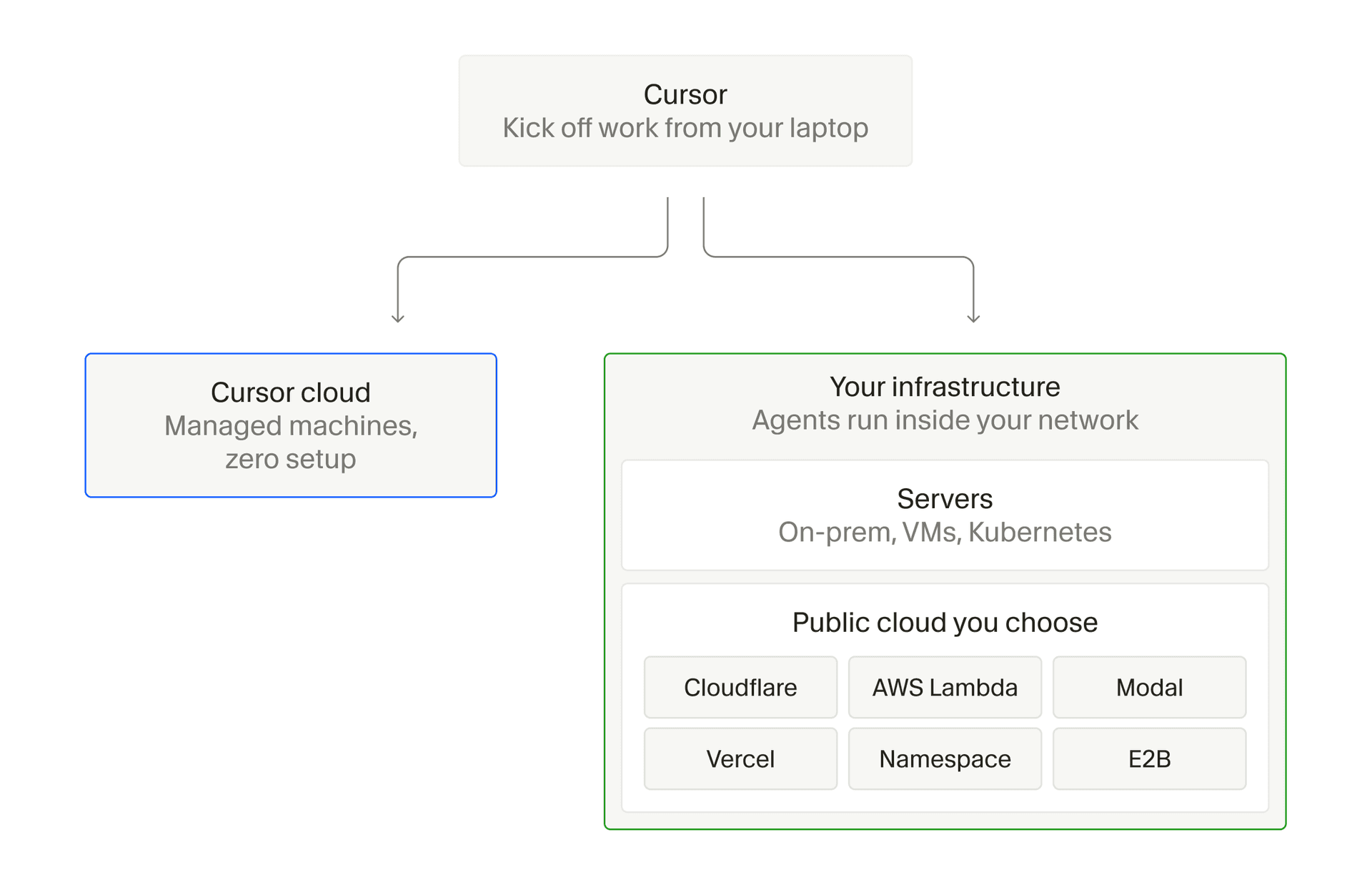
Cursor cloud agents can execute on dynamically scheduled pools of machines inside your network. You manage the underlying infrastructure, while agents are still started and managed from Cursor.
This gives teams more control over where agents execute and what infrastructure they use. Agents can work next to internal services and source control, run on custom hardware, or use operating systems and build pipelines that are difficult to package as a Cloud Agent build.
Cloud agents now create more than 60% of the pull requests we merge internally and are taking on a growing share of software work at many of the largest enterprises we work with. As their role expands, the machines they run on matter more too. These new capabilities make it practical for teams to provide and manage that infrastructure at scale.
With Lambda MicroVMs as the compute layer for Cursor Cloud Agents, developers can run AI-powered coding agents in their own AWS account. Each machine launches near-instantly from a snapshot, suspends when idle, and resumes with full state. Your coding agents benefit from Lambda's fast startup, strong isolation, and zero fleet management, while Cursor orchestrates the work.
Control where agents execute
Cursor-hosted environments remain the default for cloud agents. Each session runs on a dedicated VM inside the Cursor cloud, with its dependencies installed and its own network controls. Per-agent isolation, secret redaction, egress controls, and signed commits meet the security requirements of most teams.
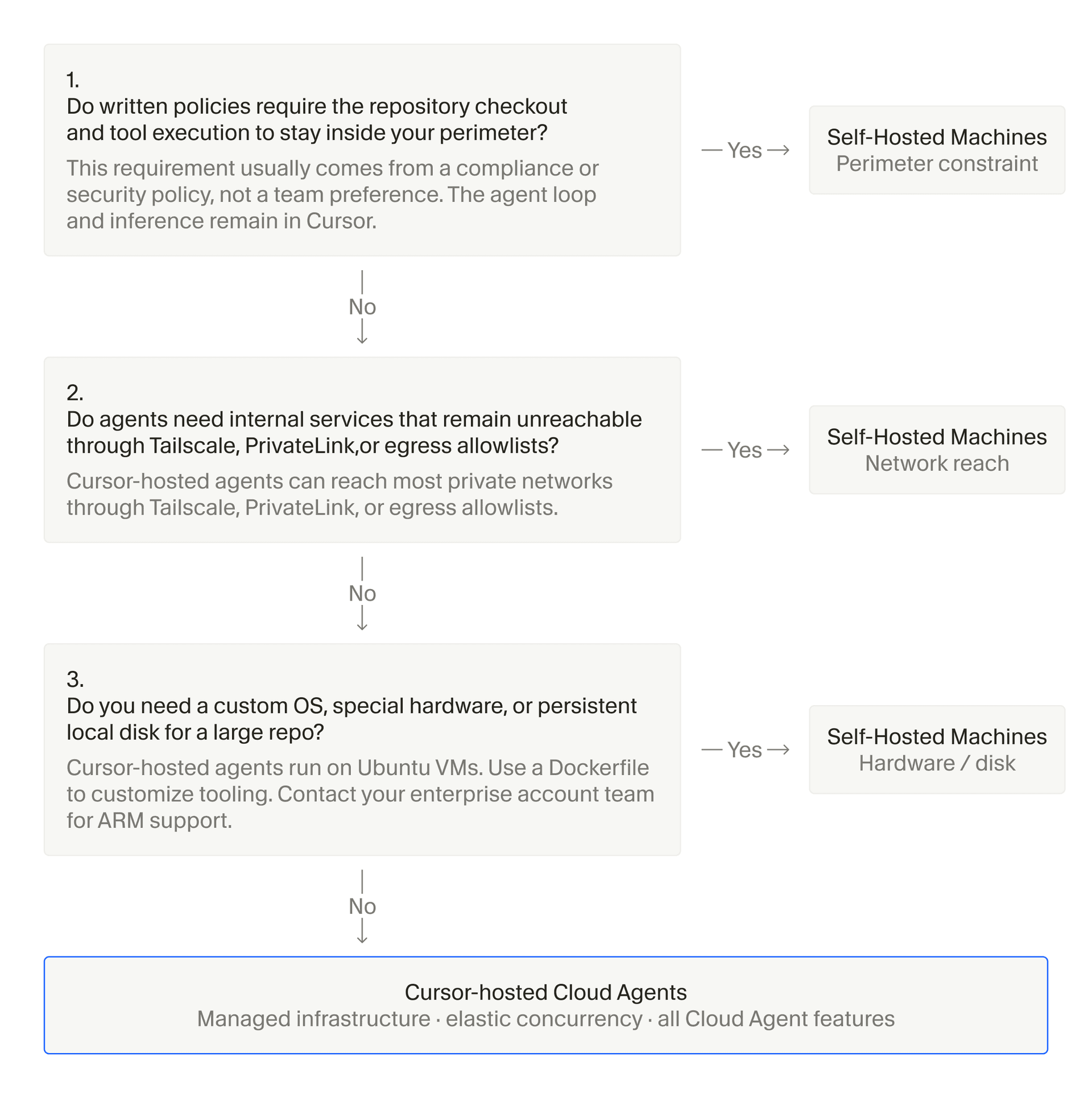
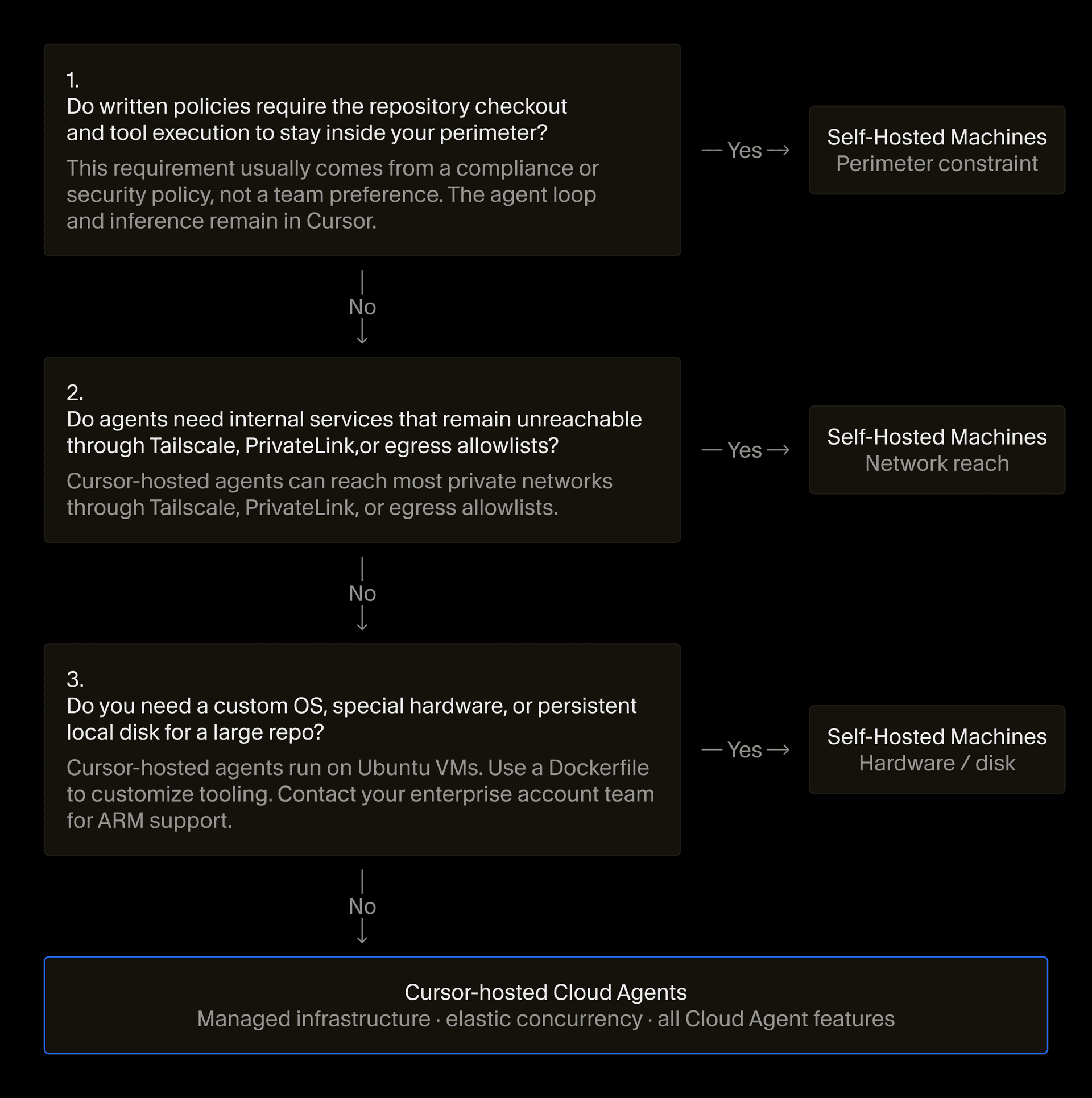
Teams generally use Self-Hosted Machines when:
- Agent tool execution needs to happen inside their network, with direct access to source control, internal services, and code repositories.
- Agents require custom hardware, such as GPUs or Macs for iOS development, or infrastructure such as Kubernetes, sandboxes, or managed VMs.
- Their operating system or build pipeline is difficult to package as a Cloud Agent build.
With Self-Hosted Machines, only the execution environment moves while the agent loop, inference, and planning remain in the Cursor cloud. Tool outputs flow back to Cursor for inference and may contain code, and agent transcripts may be processed and stored by Cursor. Teams can continue to access cloud agents from the desktop app, cursor.com, mobile, Slack, GitHub, and Linear.
Workers connect your infrastructure to the Cursor agent loop
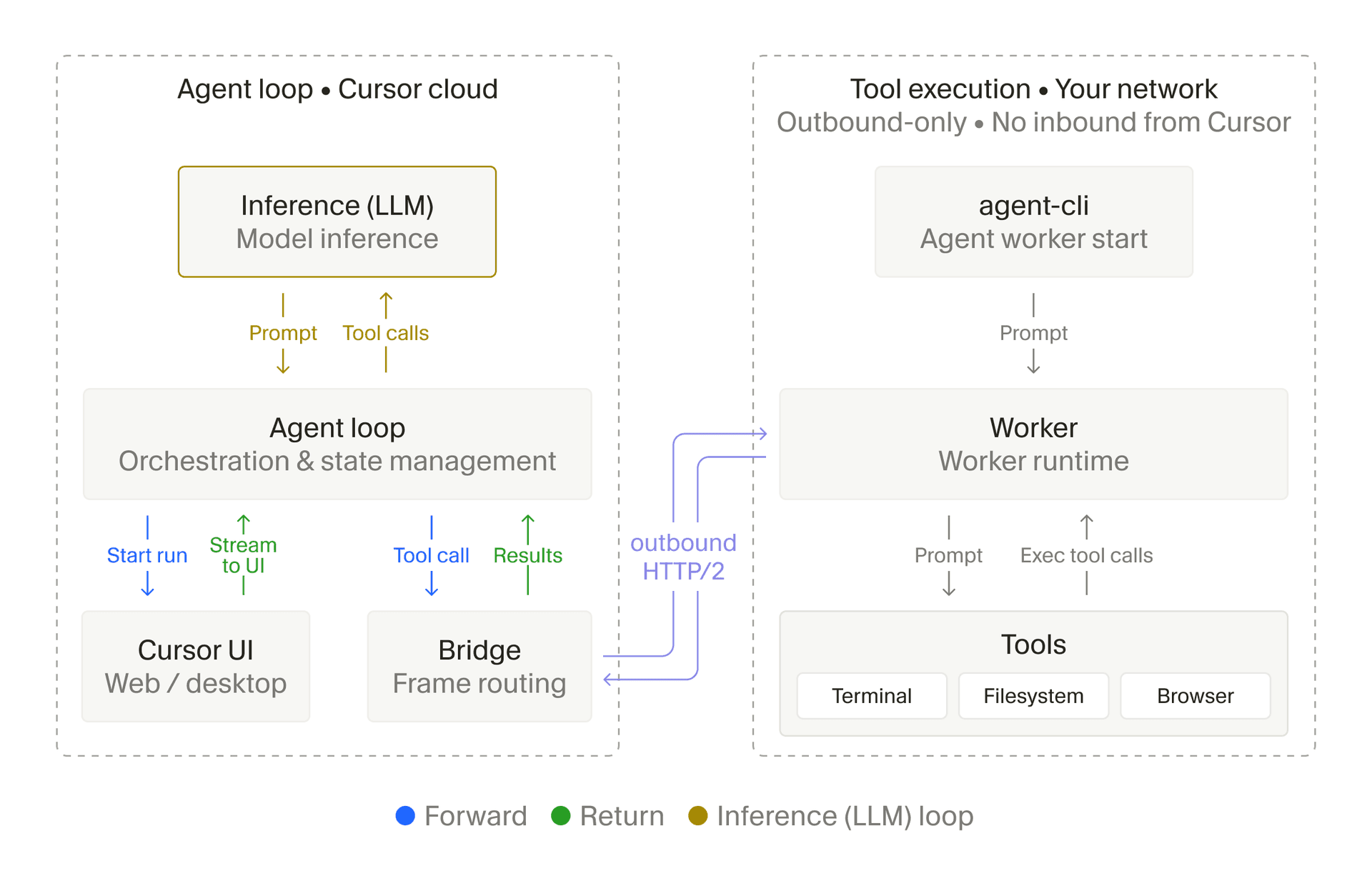
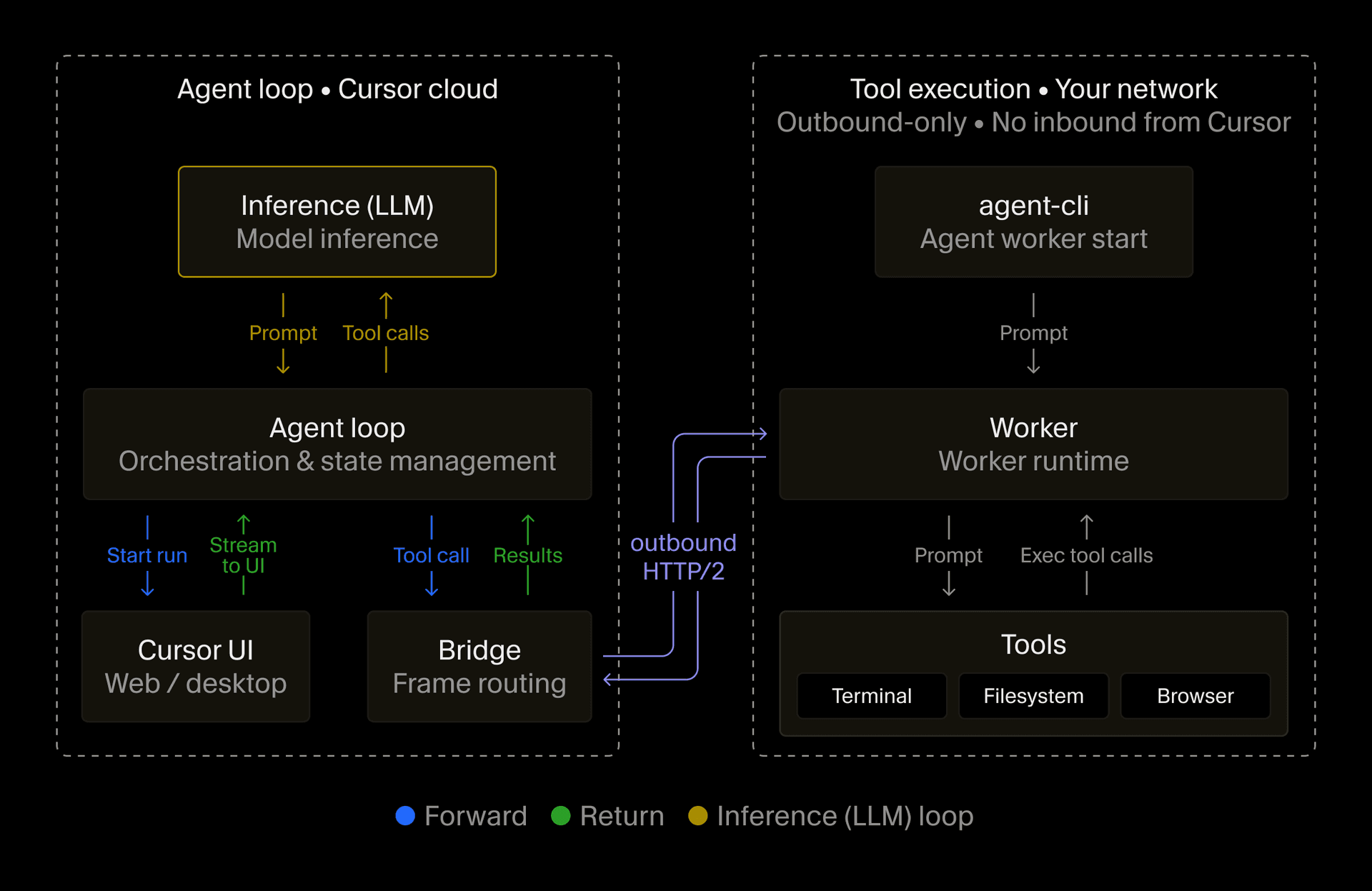
With Self-Hosted Machines, tool execution moves from a Cursor-hosted VM to a machine in your environment. That machine holds the working copy of the repository, edits files, and runs commands. A worker connects it to the rest of the agent system.
To register a machine, run a worker by installing the Cursor CLI and running agent worker start. This opens a long-lived outbound HTTPS connection to the Cursor cloud. When a session begins, Cursor's agent harness handles inference and planning, then sends tool calls to a dedicated worker for execution. The worker returns the results for the next round of inference. Cursor never initiates a connection into your network.
Workers can be configured in two ways.
- My Machines. This configuration connects a single laptop or VM to your account and is best suited to personal workflows.
- Pools. A pool is a named queue of workers that can serve a team or enterprise. Capacity increases as requests arrive and decreases after workers disconnect, letting your existing cloud infrastructure scale with developer demand.
Developers should have the flexibility to run coding agents on the platform that best supports their workflow, and companies should not have to compromise on control of where agents run and what they can access. The future of development will be built on powerful agents, running in secure, isolated environments.
Cloud agents adapt to your infrastructure
Worker pools can now scale in response to queued requests and serve work from any repository. We have also added support for several sandbox providers and computer use on Linux alongside Mac.
Pools scale with demand and serve any repository
Demand for cloud agents often arrives in bursts and Self-Hosted Machines pools adjust to those bursts automatically. This happens through a controller which watches the request queue and uses a spawn script supplied by the team to start machines as needed.
If a pool has an available worker, that worker claims the request. Otherwise, the request waits until more capacity becomes available, so teams do not have to decide how many machines to leave running.
Teams can set an idle timeout for each worker connection. Once it expires, the machine can reset and re-enter the pool. Teams can also preserve its workspace in case the agent receives a follow-up.
Self-Hosted Machines put teams in control of where Cursor agents run, and Vercel Sandbox makes it effortless. Every task gets an isolated sandbox on demand, no fleet to manage, and nothing sitting idle.
Leaving a machine running while its agent is idle can be expensive. But if the machine is released, the agent may need several minutes to reconstruct its workspace when a follow-up arrives. With hibernation, teams can snapshot and stop an idle machine instead. If a follow-up arrives within the reconnect window, the snapshot is restored and a worker starts with the same ID. Otherwise, the request can move to a new machine.
Pools are not tied to individual repositories. A request only needs to identify the pool, and any available worker can claim it. This lets one pool serve many repositories.
Workers run across supported sandbox providers
Self-Hosted Machines does not require building a custom sandbox layer from scratch. We partner with AWS Lambda, Cloudflare, Coder, Daytona, E2B, Modal, Namespace, and Vercel, allowing workers to be started and orchestrated wherever a team's sandboxes already run.
Cursor Self-Hosted Machines on Modal gives each Cloud Agent session a Modal Sandbox, so you can hand it a machine tailor-made for its task.
Agents control browsers on Linux and Mac
Linux workers now support computer use alongside Macs. With the required computer use dependencies installed, including Chrome or Chromium, an agent can click, take screenshots, and control the browser. You can watch its desktop or take control directly from Cursor.
You can't build iOS or macOS apps without a Mac. Namespace Devboxes spin up a real Mac for each Cursor Cloud Agent, which can now perform that work on Apple silicon.
Bring cloud agents into your environment
Teams have spent years shaping their infrastructure around how they build software. Self-Hosted Machines lets cloud agents fit more naturally into it, and we're excited to see how far teams take them.
To connect a machine or configure a pool, get started in the docs.


