Cursor agents can now control their own computers


Agents are only as capable as the environment they run in. Without the ability to use the software they are creating, agents hit a ceiling.
Over the last few months, we addressed this internally by giving agents their own virtual machines with full development environments, and the ability to test their changes and produce artifacts (videos, screenshots, and logs) so you can quickly validate their work.
Today we're making a new version of Cursor cloud agents available from anywhere you work, including the web, mobile, desktop app, Slack, and GitHub. Cloud agents onboard themselves onto your codebase and produce merge-ready PRs with artifacts to demo their changes. You can also control the agent's remote desktop to use the modified software and make edits yourself, without checking out the branch locally.
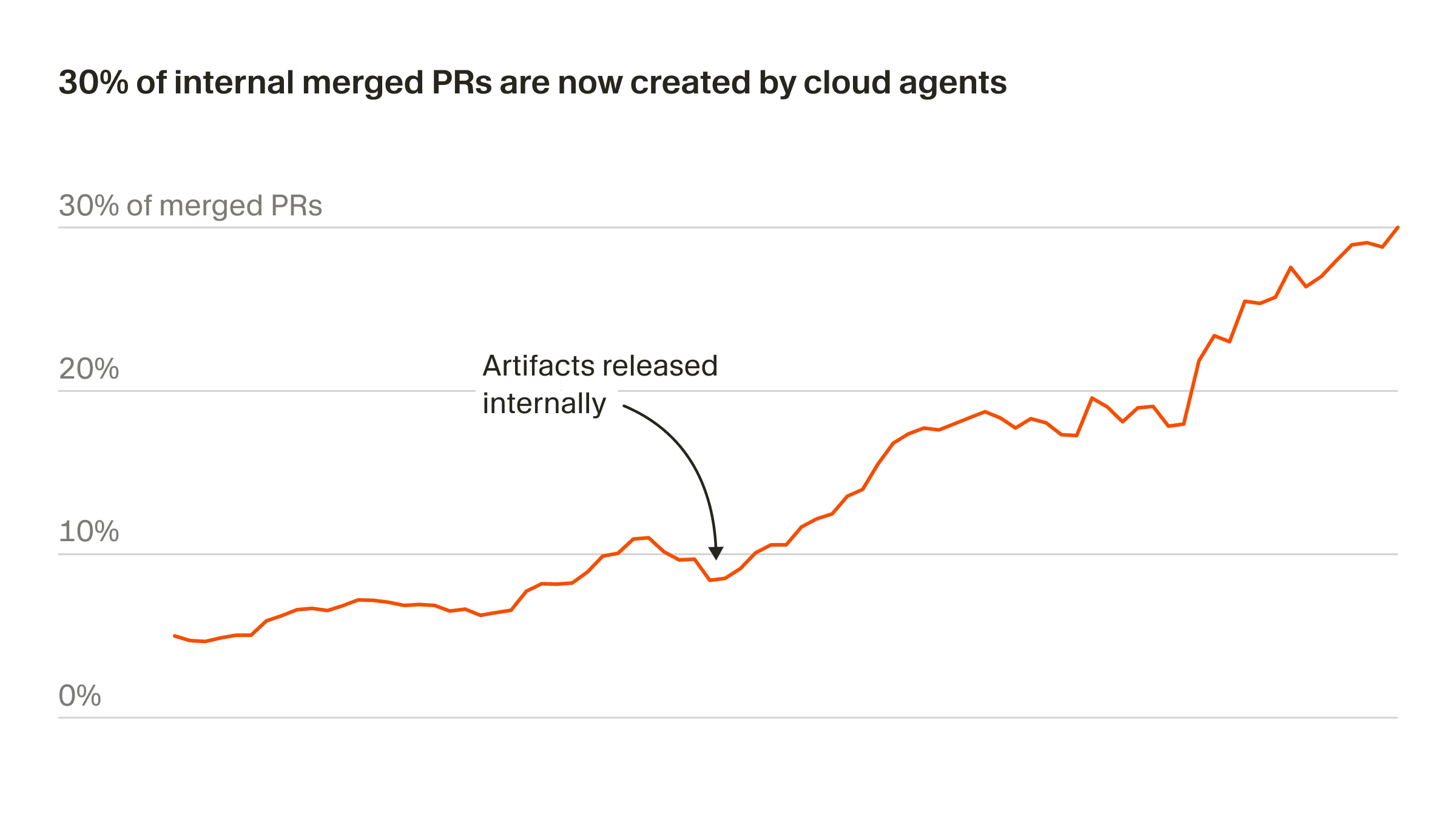
This has been the biggest shift in how we build software since the move from Tab autocomplete to working synchronously with agents. More than 30% of the PRs we merge at Cursor are now created by agents operating autonomously in cloud sandboxes.
The next level of autonomy
Local agents make it easy to start generating code, but they quickly run into conflicts and compete with each other (and with you) for your computer's resources. Cloud agents remove this constraint by giving each agent an isolated VM, so you can run many in parallel.
Cloud agents can also build and interact with software directly in their own sandbox, allowing them to iterate until they've validated their output rather than handing off the first attempt. The video below shows a proof-of-concept from our earlier research on enhanced computer use.
You can see the agent navigate web pages in the browser, manipulate tools like spreadsheets, interpret data and make decisions, and resolve issues in complex UI environments.
Using cloud agents at Cursor
For the last month, we’ve been using cloud agents internally, and it has changed how we build software. Instead of breaking tasks into small chunks and micro-managing agents, we delegate more ambitious tasks and let them run on their own.
These are a few ways we’re using cloud agents:
Building new features
We used cloud agents to help us build plugins, which we recently launched on the Cursor Marketplace. Here is one of our prompts:
For each component displayed in a given plugin's page, we'd like to include a link to the source code. For skills, commands, rules, and subagents - that's the .md file. For hooks, it's the hooks.json. For mcps, it's the .mcp.json or the manifest where it's defined. As we index all the components of a plugin, keep track of the source file and construct links to that file by way of the underlying github url. Surface this to the frontend and have our frontend link out to github using this icon. Test w/
https://github.com/prisma/cursor-pluginlocally
The agent implemented the feature, then recorded itself navigating to the imported Prisma plugin and clicking each component to verify the GitHub links.
For local testing, the agent temporarily bypassed the feature flag gating the marketplace page, then reverted before pushing. It rebased onto main, resolved merge conflicts, and squashed to a single commit.
Reproducing vulnerabilities
We kicked off a cloud agent from Slack with the prompt, "Please triage and explain this vulnerability to me in great detail," followed by a description of a clipboard exfiltration vulnerability. When the agent finished running, it responded in the Slack thread with a summary of what it accomplished.
The agent built an HTML page that exploits the vulnerability via an exposed API. It started a backend server to host the demo page locally and loaded the page in Cursor’s in-app browser.
The video artifact shows the complete attack flow: the agent copied a test UUID to the system clipboard, loaded the demo page in Cursor's browser, and clicked a button to exfiltrate and display the UUID. It also took a screenshot showing the successful clipboard theft and committed the demo HTML file to the repo.
Handling quick fixes
We asked a cloud agent to replace the static "Read lints" label with a dynamic one driven by lint results. It implemented "No linter errors" for zero diagnostics and "Found N errors" for N diagnostics, with styling to match existing CSS.
The agent tested two cases in the Cursor desktop app: a file with multiple type errors and a clean file with no errors. The video artifact shows the agent verifying that the clean file has an expanded group that shows “No linter errors.”
Testing UI
We spun up a cloud agent to check that everything works correctly at cursor.com/docs. It spent 45 minutes doing a full walkthrough of our docs site. The agent provided a summary of all the features it tested, including the sidebar, top navigation, search, copy page button, share feedback dialog, table of contents, and theme switching.
Now that agents can handle most of the implementation, we’ve found that the role of a developer is more about setting direction and deciding what ships.
What's next
We’re building toward a future of self-driving codebases, where agents merge PRs, manage rollouts, and monitor production. We will go from a world where developers use agents to create diffs to one where agents ship tested features end-to-end.
To fully realize that shift will require improving tooling, models, and the interaction patterns. Our near-term focus is on coordinating work across many agents and building models that learn from past runs and become more effective as they accumulate experience.
Get started at cursor.com/onboard to watch the agent configure itself and record a demo. Or learn more in the docs.


