Build agents that run automatically


We're introducing Cursor Automations to build always-on agents.
These agents run on schedules or are triggered by events like a sent Slack message, a newly created Linear issue, a merged GitHub PR, or a PagerDuty incident. In addition to these built-in integrations, you can configure your own custom events with webhooks.
I love that automations work for both quick wins and more complex workflows. I can schedule the obvious stuff in seconds, but I still have full flexibility to catch any webhook or plug into custom MCPs when I need to.
Upgrading the software engineering pipeline
With the rise of coding agents, every engineer is able to produce much more code. But code review, monitoring, and maintenance haven’t sped up to the same extent yet. At Cursor, we’ve been using automations to help scale these other parts of the development lifecycle.
When invoked, the automated agent spins up a cloud sandbox, follows your instructions using the MCPs and models you've configured, and verifies its own output. Agents also have access to a memory tool that lets them learn from past runs and improve with repetition.
As we’ve run more automated agents on our own codebase at Cursor over the past several weeks, two categories of automations have emerged.
Review and monitoring
Automations are great for reviewing changes. They can catch and fix everything from style nits and inconsistencies to security vulnerabilities and performance regressions.
In fact, Bugbot is in many ways the original automation! It runs when a PR is opened or updated, gets triggered thousands of times a day, and has caught millions of bugs since we first launched it. Automations allow you to customize all kinds of review agents for different purposes. Here are three we use at Cursor:
Security review
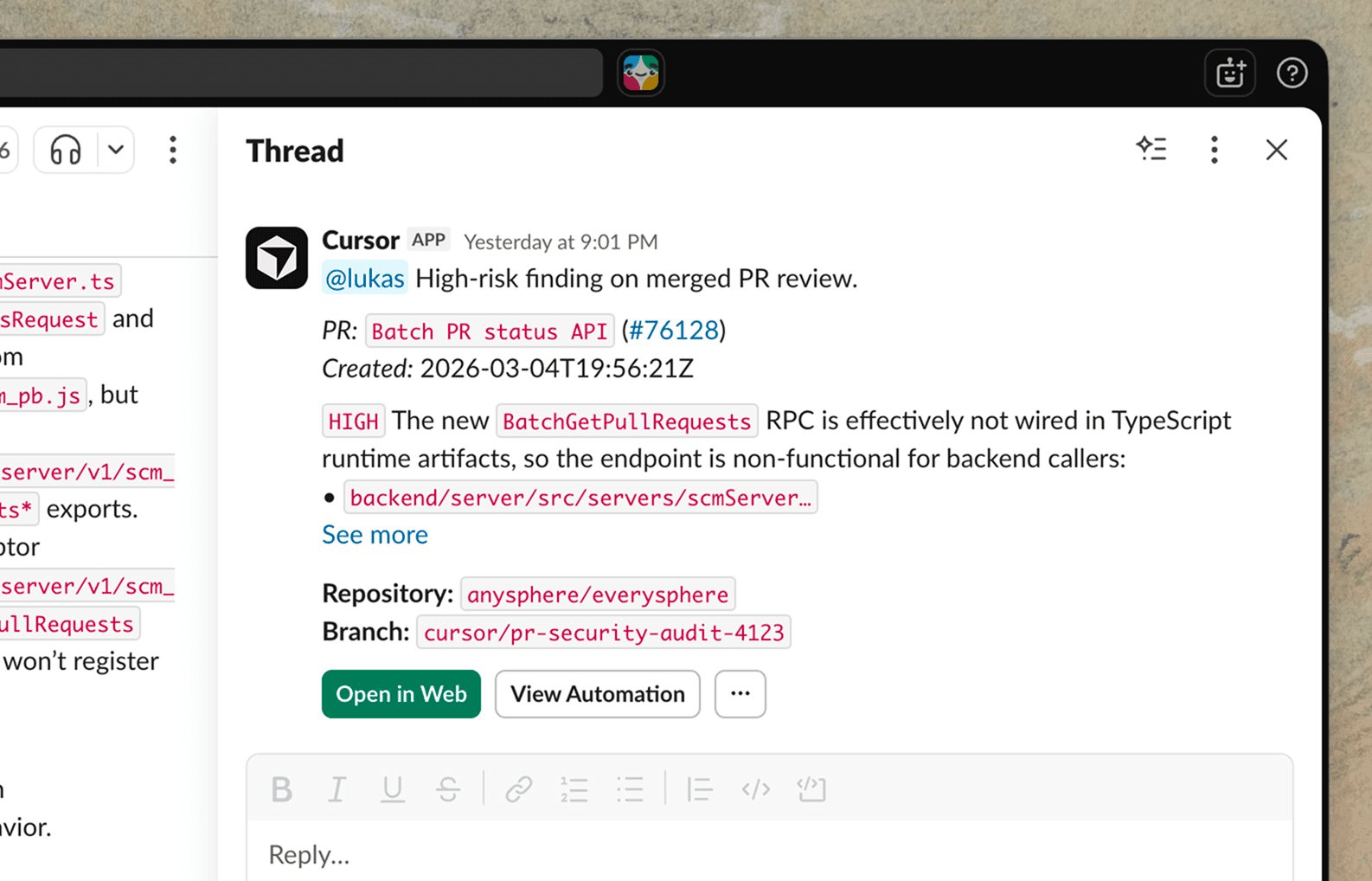
Our security review automation is triggered on every push to main. This way, the agent can work for longer to find more nuanced issues without blocking the PR. It audits the diff for security vulnerabilities, skips issues already discussed in the PR, and posts high-risk findings to Slack. This automation has caught multiple vulnerabilities and critical bugs at Cursor.
Agentic codeowners
On every PR open or push, this automation classifies risk based on blast radius, complexity, and infrastructure impact. Low-risk PRs get auto-approved. Higher-risk PRs get up to two reviewers assigned based on contribution history. Decisions are summarized in Slack and logged to a Notion database via MCP so we can audit the agent’s work and tweak the instructions.
Incident response
When triggered by a PagerDuty incident, this automation kicks off an agent that uses the Datadog MCP to investigate the logs and looks at the codebase for recent changes. It then sends a message in a Slack channel to our on-call engineers, with the corresponding monitor message and a PR containing the proposed fix. This has significantly reduced our incident response time.
Chores
We’ve also found automations useful for everyday tasks and knowledge work that require stitching together information across different tools.
Weekly summary of changes
This automation posts a weekly Slack digest summarizing meaningful changes to the repository in the last seven days. The agent highlights major merged PRs, bug fixes, technical debt, and security or dependency updates.
Test coverage
Every morning, an automated agent reviews recently merged code and identifies areas that need test coverage. It follows existing conventions when adding tests and only alters production behavior when necessary. The agent then runs relevant test targets before opening a PR.
Bug report triage
When a bug report lands in a Slack channel, this automation checks for duplicates and creates an issue using Linear MCP. The agent then investigates the root cause in the codebase, attempts a fix, and replies in the original thread with a summary.
How Rippling uses automations
Teams outside Cursor have already started building automations. Abhishek Singh at Rippling set up a personal assistant. He dumps meeting notes, action items, TODOs, and Loom links into a Slack channel throughout the day. A cron agent runs every two hours, reads everything alongside his GitHub PRs, Jira issues, and Slack mentions, deduplicates across sources, and posts a clean dashboard.
He also runs Slack-triggered automations for creating Jira issues from threads and summarizing discussions in Confluence. Singh and Rippling have extended their use of automations to handle tasks like incident triage, weekly status reports, on-call handoff, and more. The most useful automations get shared across the team.
Automations have made the repetitive aspects of my work easy to offload. By making automations to round up tasks, deal with doc updates, and respond to Slack messages, I can focus on the things that matter. Anything can be an automation!
The factory that creates your software
All of these automations are powered by cloud agents that use their own computers to build, test, and demo their work. Now you can build the factory that creates your software by configuring agents to continuously monitor and improve your codebase.
We built our software factory using Cursor Automations with Runlayer MCP and plugins. We move faster than teams five times our size because our agents have the right tools, the right context, and the right guardrails.
Try creating an automation at cursor.com/automations, or start from a template. Learn more in the docs.


