Dynamic context discovery

Coding agents are quickly changing how software is built. Their rapid improvement comes from both improved agentic models and better context engineering to steer them.
Cursor's agent harness, the instructions and tools we provide the model, is optimized individually for every new frontier model we support. However, there are context engineering improvements we can make, such as how we gather context and optimize token usage over a long trajectory, that apply to all models inside our harness.
As models have become better as agents, we've found success by providing fewer details up front, making it easier for the agent to pull relevant context on its own. We're calling this pattern dynamic context discovery, in contrast to static context which is always included.
Files for dynamic context discovery
Dynamic context discovery is far more token-efficient, as only the necessary data is pulled into the context window. It can also improve the agent's response quality by reducing the amount of potentially confusing or contradictory information in the context window.
Here's how we've used dynamic context discovery in Cursor:
- Turning long tool responses into files
- Referencing chat history during summarization
- Supporting the Agent Skills open standard
- Efficiently loading only the MCP tools needed
- Treating all integrated terminal sessions as files
1. Turning long tool responses into files
Tool calls can dramatically increase the context window by returning a large JSON response.
For first-party tools in Cursor, like editing files and searching the codebase, we can prevent context bloat with intelligent tool definitions and minimal response formats, but third-party tools (i.e. shell commands or MCP calls) don't natively get this same treatment.
The common approach coding agents take is to truncate long shell commands or MCP results. This can lead to data loss, which could include important information you wanted in the context. In Cursor, we instead write the output to a file and give the agent the ability to read it. The agent calls tail to check the end, and then read more if it needs to.
This has resulted in fewer unnecessary summarizations when reaching context limits.
2. Referencing chat history during summarization
When the model's context window fills up, Cursor triggers a summarization step to give the agent a fresh context window with a summary of its work so far.
But the agent's knowledge can degrade after summarization since it's a lossy compression of the context. The agent might have forgotten crucial details about its task. In Cursor, we use the chat history as files to improve the quality of summarization.
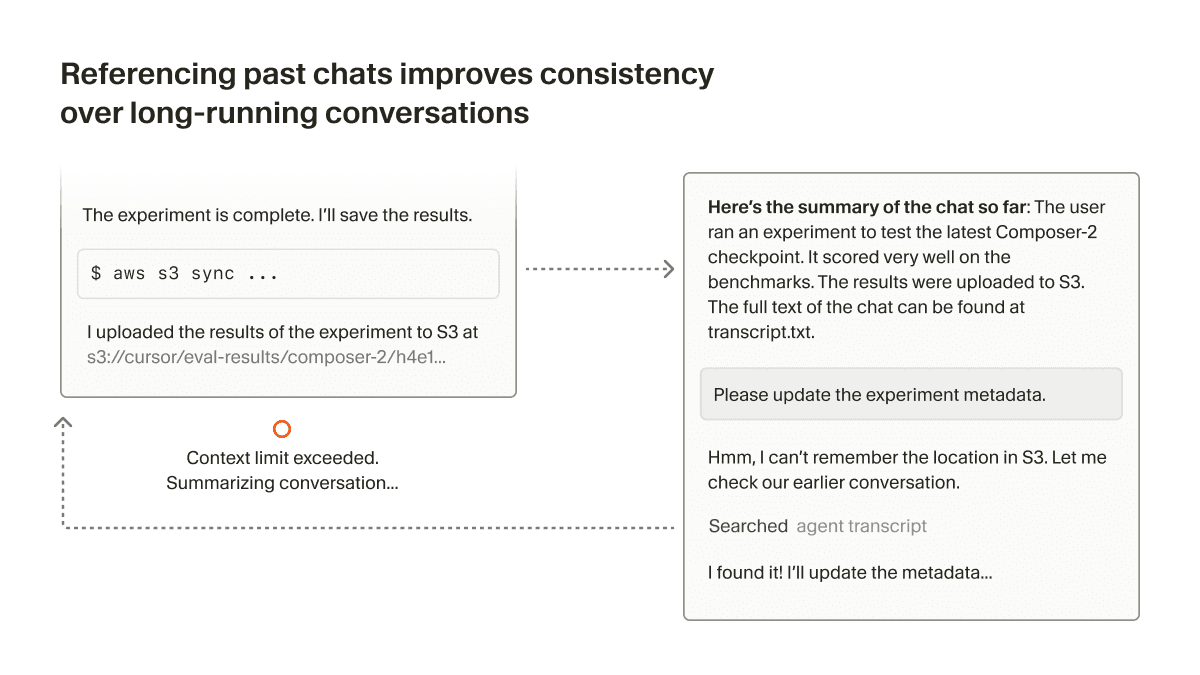
After the context window limit is reached, or the user decides to summarize manually, we give the agent a reference to the history file. If the agent knows that it needs more details that are missing from the summary, it can search through the history to recover them.
3. Supporting the Agent Skills open standard
Cursor supports Agent Skills, an open standard for extending coding agents with specialized capabilities. Similar to other types of Rules, Skills are defined by files that tell the agent how to perform on a domain-specific task.
Skills also include a name and description which can be included as "static context" in the system prompt. The agent can then do dynamic context discovery to pull in relevant skills, using tools like grep and Cursor's semantic search.
Skills can also bundle executables or scripts relevant to the task. Since they're just files, the agent can easily find what's relevant to a particular skill.
4. Efficiently loading only the MCP tools needed
MCP is helpful for accessing secured resources behind OAuth. That could be production logs, external design files, or internal context and documentation for an enterprise.
Some MCP servers include many tools, often with long descriptions, which can significantly bloat the context window. Most of these tools go unused even though they are always included in the prompt. This compounds if you use multiple MCP servers.
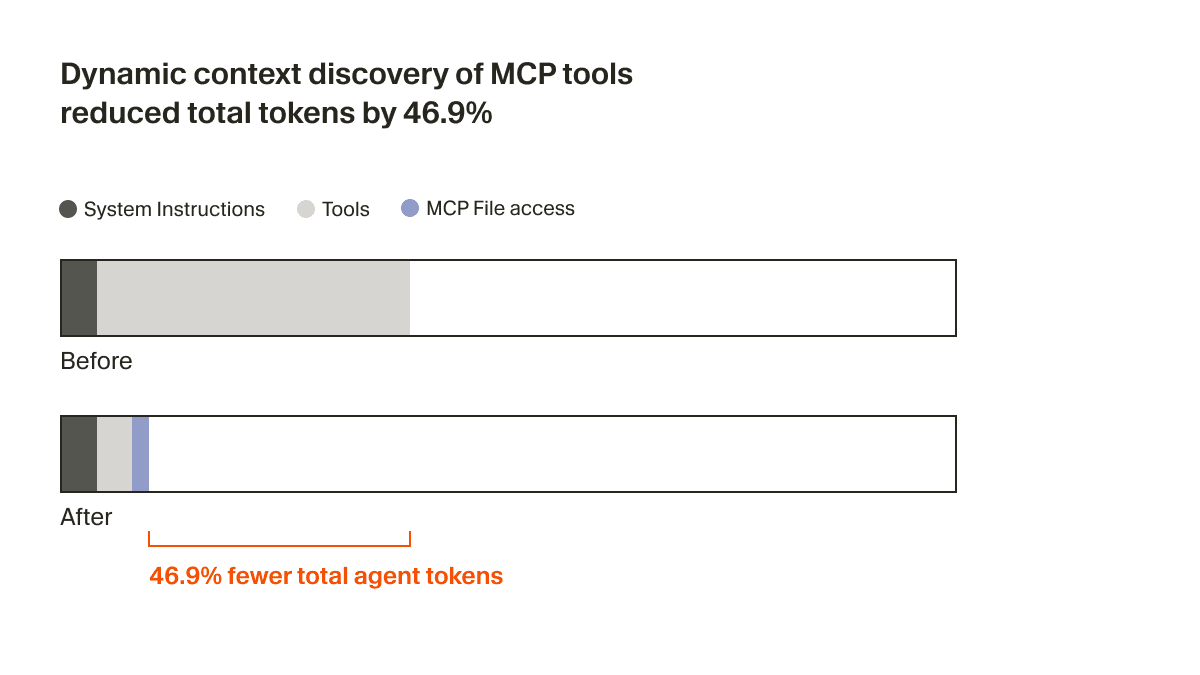
It's not feasible to expect every MCP server to optimize for this. We believe it's the responsibility of the coding agents to reduce context usage. In Cursor, we support dynamic context discovery for MCP by syncing tool descriptions to a folder.1
The agent now only receives a small bit of static context, including names of the tools, prompting it to look up tools when the task calls for it. In an A/B test, we found that in runs that called an MCP tool, this strategy reduced total agent tokens by 46.9% (statistically significant, with high variance based on the number of MCPs installed).
This file approach also unlocks the ability to communicate the status of MCP tools to the agent. For example, previously if an MCP server needed re-authentication, the agent would forget about those tools entirely, leaving the user confused. Now, it can actually let the user know to re-authenticate proactively.
5. Treating all integrated terminal sessions as files
Rather than needing to copy/paste the output of a terminal session into the agent input, Cursor now syncs the integrated terminal outputs to the local filesystem.
This makes it easy to ask "why did my command fail?" and allow the agent to understand what you're referencing. Since terminal history can be long, the agent can grep for only the relevant outputs, which is useful for logs from a long-running process like a server.
This mirrors what CLI-based coding agents see, with prior shell output in context, but discovered dynamically rather than injected statically.
Simple abstractions
It's not clear if files will be the final interface for LLM-based tools.
But as coding agents quickly improve, files have been a simple and powerful primitive to use, and a safer choice than yet another abstraction that can't fully account for the future. Stay tuned for lots more exciting work to share in this space.
These improvements will be live for all users in the coming weeks. The techniques described in this blog post are the work of many Cursor employees including Lukas Moller, Yash Gaitonde, Wilson Lin, Jason Ma, Devang Jhabakh, and Jediah Katz. If you are interested in solving the hardest and most ambitious coding tasks using AI, we'd love to hear from you. Reach out to us at hiring@cursor.com.
- We considered a tool search approach, but that would scatter tools across a flat index. Instead, we create one folder per server, keeping each server's tools logically grouped. When the model lists a folder, it sees all tools from that server together and can understand them as a cohesive unit. Files also enable more powerful searching. The agent can use full
rgparameters or evenjqto filter tool descriptions. ↩


