Implementing a secure sandbox for local agents


Coding agents are getting much better at running terminal commands to explore the environment and make changes. Users who auto-approve these commands unlock significantly more powerful agents, but at the cost of increased risk. A mistaken agent can delete databases, ship broken code, or leak secrets.
Requiring human approval for every command mitigates that risk, but often only temporarily. As approvals accumulate, users stop inspecting them carefully. This gets worse when engineers run multiple agents in parallel and have to context-switch between approval prompts. The result is approval fatigue, which undermines the point of approvals in the first place.
Over the last three months we've addressed this by rolling out agent sandboxing on macOS, Linux, and Windows. Sandboxed agents run freely inside a controlled environment and only request approval when they need to step outside it, most often to access the internet.
This reduces interruptions dramatically. Sandboxed agents stop 40% less often than unsandboxed ones, saving users hours of manual review and approval.
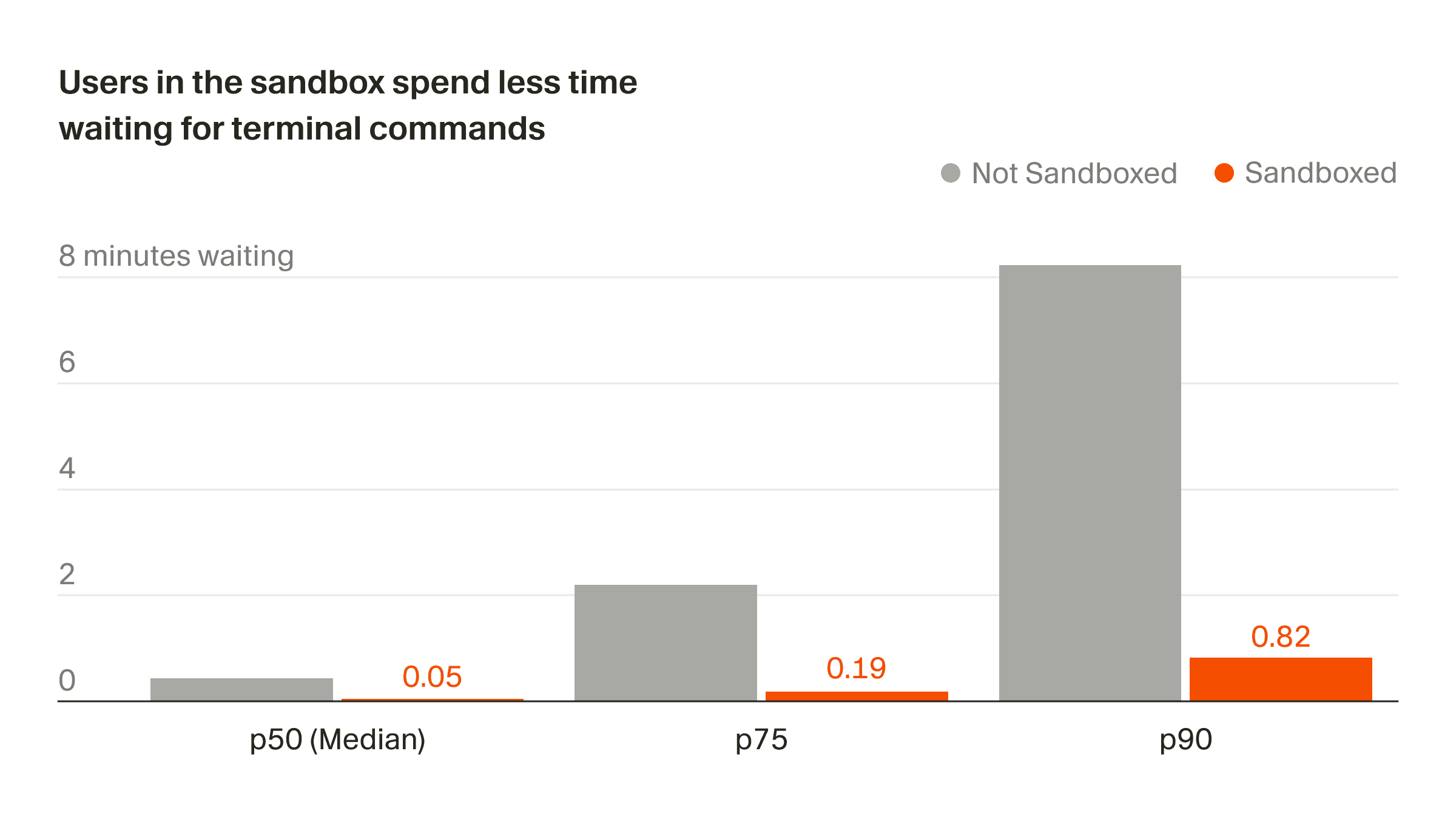
Our sandbox goals
We began our sandboxing work with the goal of eliminating interruptions while improving security. We wanted to provide agents with enough latitude to be effective, while denying them permissions that create risk.
Striking this balance is harder than it appears. Many terminal commands require unexpected privileges, even for basic test or build steps. A naive sandbox would block these and break the agent's workflow. Designing a usable sandbox is an exercise in navigating tradeoffs between security and usability, while working within the parameters set by each operating system.
Implementation
We expose a uniform sandbox API, implemented differently on each platform. macOS, Linux, and Windows offer distinct sandboxing primitives which drove the underlying design choices.
macOS
We evaluated four sandboxing approaches on macOS: App Sandbox, containers, virtual machines, and Seatbelt. App Sandbox is designed for the Mac App Store and would require Cursor to sign every binary an agent might execute. This would have added significant complexity and opened up new abuse vectors by allowing agent-generated or modified binaries to inherit Cursor's trust. Containers would limit us to Linux binaries, and virtual machines impose unacceptable startup latency and memory overhead.
This left Seatbelt, accessed via sandbox-exec. It was introduced in 2007 and deprecated in 2016, but is still used by critical third-party applications like Chrome. It allows a command to run under a sandbox profile that constrains the behavior of an entire subprocess tree.
The profile defines permissions with fine granularity, restricting syscalls and reads or writes to specific files and directories through an idiosyncratic policy language. We generate this policy dynamically at runtime based on workspace-level and admin-level settings, along with the user's .cursorignore.
(deny file-write* (regex "^.*\/\\\.vscode($|\/.*)")
)
(deny file-write* (require-all
    (regex "^.*\/\\\.cursor($|\/.*)")
    (require-not (regex "^.*\/\\\.cursor/(rules|commands|worktrees|skills|agents)($|\/.*)")))
)
(deny file-write* (regex "^.*\\\.code-workspace$"))
(deny file-write* (regex "^.*\/\\\.cursorignore$"))
(deny file-write* (regex "^.*\/\\\.git/config$"))
(deny file-write* (regex "^.*\/\\\.git/hooks($|\/.*)")
)
(deny file-write* (regex "^(/private)?/var/folders/.*-cursor(-[a-z]+)?-zsh($|\/.*)")
)
Linux
Linux is both easier and harder than macOS. The kernel exposes the required primitives via Landlock and seccomp, but userspace is responsible for composing them into a usable sandbox. While several open-source projects combine these mechanisms effectively, none support features such as .cursorignore.
We decided to use Landlock and seccomp directly. Seccomp blocks unsafe syscalls, while Landlock enforces filesystem restrictions, letting us make ignored files completely inaccessible to the sandboxed process. We map user workspaces into an overlay filesystem and overwrite ignored files with Landlocked copies that can't be read or modified.
Finding and remounting these files is the slowest part of Linux sandboxing. It would be easier to lazily filter filesystem operations the way macOS does, but Linux doesn't provide easy access to the file path in a seccomp-bpf context.
Windows
On Windows, we run our Linux sandbox inside WSL2. Building an equivalent native Windows sandbox is significantly harder because most existing sandboxing primitives are tailored to browsers and do not support general-purpose developer tools. We're working with Microsoft to ensure the necessary primitives become available.
Teaching agents how to use the sandbox
A sandbox is only effective if agents can anticipate which commands will succeed inside the sandbox and recognize when escalation is required. Making models sandbox-aware required changes to the agent harness.
We began by updating the Shell tool descriptions to explain sandbox constraints: whether commands run with filesystem, git, or network access based on user settings, and how the agent can request elevated permissions when needed. Getting a baseline harness change we were satisfied with required a lot of manual testing, where we would execute a few common rollouts, notice where things went different than expected, tweak the prompt, and run the rollouts again.
We then evaluated the impact of these changes using our internal benchmark, Cursor Bench, comparing agents with and without sandboxing enabled. We quickly noticed a common failure mode: the agent would repeatedly retry the same terminal command without changing permissions.
To address this, we updated how Shell tool results are rendered, explicitly surfacing the sandbox constraint responsible for a failure and, in certain cases, recommending that the agent escalate permissions. After shipping these reminders agents recovered far more gracefully from sandbox-related failures and offline eval performance improved significantly.
Offline evals only paint a small part of the picture, though. To gain additional assurance that sandboxing would not degrade user experience, we slowly rolled out the sandbox in production. The feedback we received both internally and externally gave us the confidence to ship the feature. We now see a third of requests on supported platforms running with the sandbox, and have onboarded many enterprise customers such as NVIDIA.
As agents cross from generating code to operating production systems, providing execution boundaries is paramount. Our current implementation is a step in that direction. Going forward, we're especially excited about sandbox-native agents trained on the constraints of their environment. These agents can be given the freedom to write scripts and programs directly, rather than being limited to tool-calling.
If you're interested in working on deep technical problems related to the future of coding, reach out at hiring@cursor.com.


